Co-Managed IT Services Explained for SMB Decision-Makers
By TechTrone Team — Published 2026-06-24
Co-Managed IT Services Explained for SMB Decision-Makers
TL;DR:
- Co-managed IT services involve a shared responsibility between a company’s internal IT team and an external provider, maintaining control while filling operational gaps. This model offers workload relief, access to advanced tools, and continuous coverage, enhancing security and compliance for SMBs. Successful implementation depends on clear role definitions, integrated tools, and ongoing team collaboration to maximize benefits.
Co-managed IT services are defined as a shared-responsibility model where your internal IT team and an external Managed Service Provider (MSP) divide operational duties to strengthen your overall IT function. This arrangement is not outsourcing. Your team retains strategic control while the MSP fills gaps in coverage, tooling, and specialized expertise. According to Gartner 2023 data, 60% of mid-market CIOs expect growth in co-managed IT partnerships due to talent shortages and rising complexity. That figure signals a structural shift, not a passing trend. For business owners on Long Island and across the country, understanding co-managed IT services explained in plain terms is the first step toward making a smarter IT decision.
What are co-managed IT services and how do responsibilities get divided?
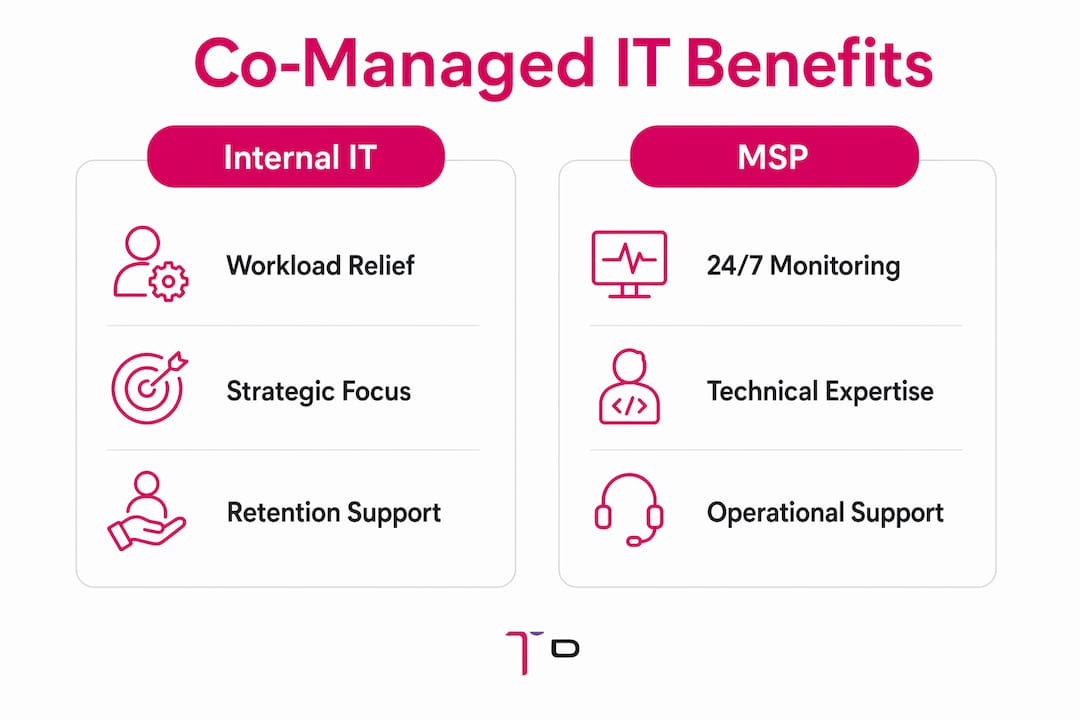
Co-managed IT services defined at their core means two teams share a single IT environment under clearly assigned roles. The MSP typically handles the operational layer: 24/7 monitoring, patch management, threat detection, help desk overflow, and cloud infrastructure management. Your internal team focuses on the strategic layer: vendor relationships, user onboarding, business alignment, and project planning.
This division is not arbitrary. Internal IT acts as the strategic advocate for the business, while the MSP functions as the operational engine. That separation prevents duplication, reduces friction, and keeps your internal staff focused on high-value work rather than reactive ticket queues.
Common responsibility splits in a co-managed IT service model include:
-
MSP responsibilities: Security monitoring, endpoint protection, patch deployment, backup management, after-hours help desk, and compliance reporting
-
Internal IT responsibilities: IT strategy, vendor negotiations, employee onboarding, application ownership, and executive-level technology planning
-
Shared responsibilities: Incident response, documentation, change management, and project execution
The tools that hold this model together matter as much as the contract. Shared ticketing systems and unified documentation platforms are non-negotiable for a functional handoff process. Without them, tasks fall through the cracks and both teams end up duplicating effort or missing critical alerts.
Pro Tip: Before signing any co-managed IT agreement, confirm that the MSP uses a Remote Monitoring and Management (RMM) platform your internal team can access in real time. Visibility is the foundation of trust in this model.
| Function | Internal IT | MSP |
|---|---|---|
| Security monitoring | Oversight | Primary execution |
| Help desk (business hours) | Primary | Backup |
| After-hours support | Limited | Primary |
| IT strategy and planning | Primary | Advisory |
| Patch management | Oversight | Primary execution |
| Compliance reporting | Oversight | Primary execution |
What are the key benefits of co-managed IT for SMBs?
The benefits of co-managed IT go well beyond simple cost savings. The most direct advantage is workload relief. Internal IT staff at small and mid-sized businesses frequently carry responsibilities that exceed what one or two people can handle sustainably. Burnout leads to turnover, and turnover creates dangerous knowledge gaps.
Co-managed IT distributes workload and provides continuity so businesses are not left exposed when an internal IT employee is sick, on vacation, or leaves the company. That continuity is a concrete operational safeguard, not a theoretical benefit.
Additional benefits your business gains from this model include:
-
Access to enterprise-grade tools: MSPs bring advanced security monitoring, compliance frameworks, and faster project execution that most SMBs cannot afford to build independently
-
Cost-effective scaling: You add capability without adding full-time headcount, which keeps payroll and benefits costs predictable
-
After-hours coverage: Your systems are monitored around the clock without requiring your internal team to be on call
-
Stronger compliance posture: Shared-responsibility models are favored by insurers and auditors because redundancy reduces single points of failure
-
Internal IT career growth: When the MSP absorbs reactive tasks, your internal staff shifts to strategic projects, which improves job satisfaction and retention
The retention angle is underappreciated. Internal IT teams become more strategic and less burdened by reactive tasks when partnering with an MSP. That shift makes the IT role more rewarding and reduces the likelihood of losing experienced staff to larger organizations.
Co-managed IT vs managed IT: how do the models compare?

Understanding co-managed IT requires a clear comparison against the two alternatives: fully managed IT and fully in-house IT. Each model has a distinct risk and control profile.
Fully in-house IT means your business employs all IT staff directly and owns all tools and processes. You retain complete control, but you also absorb all costs, all coverage gaps, and all hiring risk. For most SMBs, building a team capable of covering cybersecurity, cloud, compliance, and help desk functions is financially out of reach.
Fully managed IT transfers all IT operations to an MSP. Your business has no internal IT staff. This model works well for very small businesses with simple environments, but it removes institutional knowledge from your organization entirely. Co-managed IT is commonly mistaken for this type of outsourcing, which is a critical misconception. The co-managed model preserves your culture, your internal expertise, and your strategic control.
| Feature | In-house IT | Co-managed IT | Fully managed IT |
|---|---|---|---|
| Internal control | Full | Shared | None |
| After-hours coverage | Limited | Full | Full |
| Cost | High (headcount) | Moderate | Predictable flat fee |
| Institutional knowledge | Retained | Retained | Lost |
| Access to advanced tools | Limited | Full via MSP | Full via MSP |
| Scalability | Slow | Fast | Fast |
The co-managed IT service model occupies the middle ground deliberately. It is designed for businesses that have invested in internal IT talent and want to protect that investment while adding external depth.
Pro Tip: If your internal IT team spends more than 40% of its time on help desk tickets and routine maintenance, that is a strong signal that a co-managed arrangement would free them for higher-impact work.
How to implement co-managed IT successfully
Successful implementation of a co-managed IT arrangement depends on process and culture, not just contract terms. The quality of handoff processes and team integration determines whether the model delivers value or creates confusion.
Follow these steps to set up the arrangement correctly from day one:
-
Define roles in writing before work begins. Document exactly which team owns which functions. Ambiguity in a shared environment creates gaps and blame cycles. Your Service Level Agreement (SLA) should name specific responsibilities, not just general categories.
-
Integrate tools early. Connect the MSP to your ticketing system, documentation platform, and RMM tool before the partnership goes live. Granting MSPs audited access to critical systems requires rigorous protocols to maintain uptime and security integrity. Set access controls and audit logs from the start.
-
Address internal IT resistance directly. Some internal IT staff interpret co-managed arrangements as a threat to their jobs. Address this concern openly. Frame the MSP as a resource that removes the work your team dislikes, not a replacement for the work they value.
-
Treat MSP staff as team members. Early integration succeeds when businesses treat MSP staff as extensions of the internal team rather than replacement vendors. Include them in relevant team meetings and share business context so they can make better decisions.
-
Review the arrangement quarterly. Business needs change. A quarterly review of ticket volume, response times, and unresolved issues keeps the partnership aligned with your actual operational needs. Use a custom IT service plan to adjust scope as your business grows.
Pro Tip: Build a shared knowledge base from the first week of the partnership. Every resolved issue, every system change, and every vendor contact should be documented in one place both teams can access. This single practice prevents more problems than any SLA clause.
Key Takeaways
Co-managed IT services deliver the most value when role clarity, shared tooling, and a collaborative mindset are established before the partnership begins.
| Point | Details |
|---|---|
| Clear definition matters | Co-managed IT is a shared-responsibility model, not outsourcing; internal control is preserved. |
| Role division drives success | MSPs handle operational tasks; internal IT focuses on strategy and business alignment. |
| SMBs gain enterprise capabilities | Access to advanced security, compliance tools, and 24/7 coverage without full headcount costs. |
| Implementation requires process | Shared ticketing, audited MSP access, and documented SLAs prevent gaps and confusion. |
| Retention improves with the model | Internal IT staff shift to strategic work, reducing burnout and improving job satisfaction. |
Why co-managed IT is the model most SMBs should be using right now
From working directly with SMBs on Long Island, the pattern is consistent. Businesses with one or two internal IT staff are not understaffed because they hired the wrong people. They are understaffed because the scope of modern IT has expanded faster than any small team can absorb. Cybersecurity alone now requires tools, monitoring, and expertise that did not exist as standard requirements five years ago.
The co-managed model is not a compromise. It is the correct structural answer to that problem. What I see most often is that business owners delay the conversation because they assume co-managed IT means losing control or admitting their internal team is not good enough. Neither is true. The businesses that adopt this model early tend to retain their IT staff longer, respond to incidents faster, and pass compliance audits with less scrambling.
The emerging trend worth watching is AI-assisted monitoring within co-managed environments. MSPs are beginning to integrate AI-driven anomaly detection and automated remediation into their toolsets. That means the operational layer of a co-managed arrangement will become faster and more proactive over the next few years. Businesses that establish a co-managed partnership now will be positioned to absorb those capabilities without rebuilding their IT structure from scratch.
The one pitfall I see repeatedly is skipping the role definition step. Teams assume the division of labor will sort itself out organically. It does not. The first three months of a co-managed arrangement either build the foundation for a strong partnership or create the friction that causes it to fail. Invest the time upfront.
— TechTrone Team
How Techtrone IT Services supports your co-managed IT goals
Techtrone IT Services works with SMBs across Long Island to build co-managed IT arrangements that fit your existing team structure and business goals. Whether you need after-hours coverage, cybersecurity services to strengthen your compliance posture, or a structured plan that defines exactly how responsibilities are shared, Techtrone IT Services brings the tools and experience to make the partnership work.
Your internal IT team keeps its strategic role. Techtrone IT Services fills the operational gaps with 24/7 monitoring, threat detection, and help desk support. The result is a more resilient IT function without the cost of expanding your headcount. Explore managed IT services from Techtrone IT Services and request a free assessment to see exactly where a co-managed model can strengthen your operations.
FAQ
What is co-managed IT services in simple terms?
Co-managed IT services is a partnership where your internal IT team and an external MSP share responsibility for your IT environment. Your team handles strategy and business alignment while the MSP covers operational tasks like monitoring, patching, and after-hours support.
How is co-managed IT different from fully managed IT?
Fully managed IT transfers all IT operations to an MSP with no internal team involved. Co-managed IT keeps your internal staff in place and adds MSP support for specific functions, preserving institutional knowledge and internal control.
Is co-managed IT more cost-effective than hiring additional IT staff?
Co-managed IT typically costs less than adding full-time IT employees because you pay for specific services rather than full salaries, benefits, and training. It also provides access to enterprise-grade tools that would be expensive to license independently.
What size business benefits most from a co-managed IT model?
SMBs with one to five internal IT staff members benefit most. These businesses have enough internal expertise to retain strategic control but not enough headcount to cover all operational functions, especially after-hours monitoring and specialized cybersecurity.
Does co-managed IT work for businesses with compliance requirements?
Co-managed IT is well-suited for compliance-heavy environments. Shared-responsibility models are favored by insurers and auditors because the redundancy and documented access controls reduce the risk of a single point of failure in your IT environment.